
CRM ERP Implementation Process: 7 Steps and Common Mistakes
CRM & ERP Implementation: How It Works and What It Takes
In today’s competitive business landscape, companies need more than just software, they need intelligent systems that connect every department, automate repetitive tasks, and provide real-time business insights. That’s where a well-planned CRM ERP implementation becomes essential.
Whether you’re a growing startup or an established enterprise, implementing the right Customer Relationship Management (CRM) and Enterprise Resource Planning (ERP) solution can dramatically improve operational efficiency, customer satisfaction, and profitability.
At Dezhyne, we provide end-to-end CRM and ERP implementation services that help businesses streamline operations, eliminate manual processes, and accelerate digital transformation. This guide explains what a CRM ERP implementation involves, how to tell if you are ready, how to choose a platform, how long it takes, and the mistakes that cause projects to run late and over budget.
Table of contents
- What is CRM & ERP Implementation?
- CRM vs ERP: What Is the Difference?
- Benefits of CRM & ERP Implementation
- Signs Your Business Is Ready for CRM ERP Implementation
- Industries That Benefit from CRM & ERP Solutions
- How to Choose the Right CRM and ERP Platform
- Our CRM ERP Implementation Process in 7 Steps
- How Long Does a CRM ERP Implementation Take?
- What Drives the Cost of CRM ERP Implementation?
- Cloud or On-Premise?
- Data Migration Checklist
- Preparing Your Team for the Change
- Mistakes That Make a CRM ERP Implementation Fail
- Measuring Success After Go-Live
- Why Choose Dezhyne Labs?
- Serving Businesses Worldwide
- Frequently Asked Questions
- Future-Proof Your Business Today
What is CRM & ERP Implementation?
CRM (Customer Relationship Management) focuses on managing customer interactions, sales pipelines, marketing campaigns, and customer support.
ERP (Enterprise Resource Planning) integrates core business functions such as finance, accounting, procurement, inventory, manufacturing, HR, and operations into one centralized platform.
A successful CRM ERP implementation ensures every department works from the same data source, improving collaboration and reducing costly errors. Implementation is more than installing software. It covers process design, configuration, data migration, integrations, training and the support that follows go-live.
CRM vs ERP: What Is the Difference?
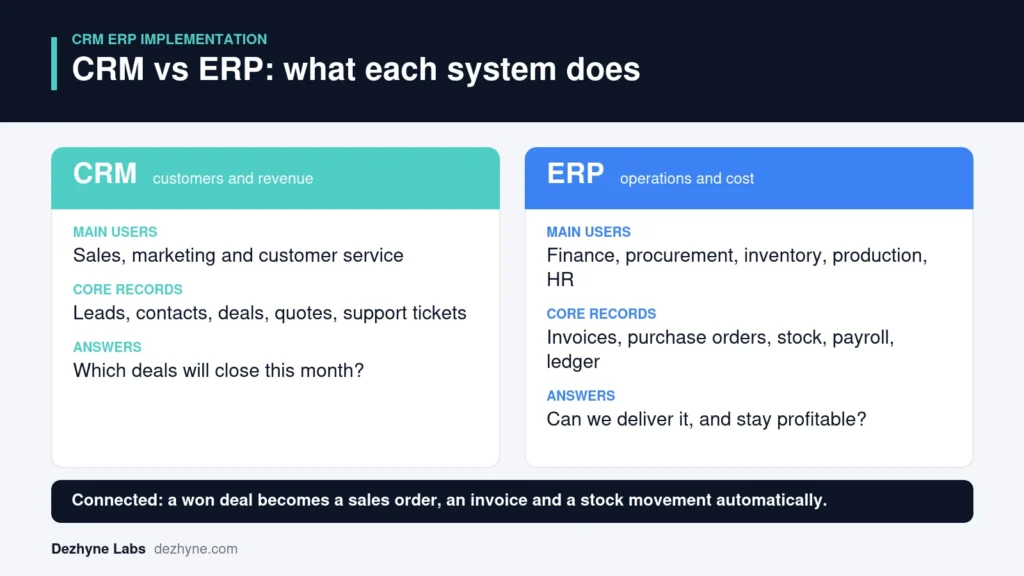
The two systems are often bought together, but they solve different problems. A simple way to remember it: CRM looks outward at customers and revenue, while ERP looks inward at operations and cost.
- Main users – CRM is used by sales, marketing and customer service. ERP is used by finance, procurement, inventory, production and HR.
- Core records – CRM holds leads, contacts, deals, quotes and support tickets. ERP holds invoices, purchase orders, stock, bills of materials, payroll and the general ledger.
- Typical question it answers – CRM tells you which deals will close this month. ERP tells you whether you have the stock, cash and capacity to deliver them.
- Where they meet – a won deal in the CRM becomes a sales order, an invoice and a stock movement in the ERP.
That handover point is where most of the value sits. When the two systems are connected, sales can see stock and payment status, and finance can see the pipeline that drives next quarter’s cash flow. A joint CRM ERP implementation plans that connection from the start instead of bolting it on later.
Benefits of CRM & ERP Implementation
1. Increase Business Efficiency
Manual spreadsheets and disconnected software slow down business growth. A modern ERP and CRM system automates daily operations, allowing your team to focus on strategic business goals.
2. Better Customer Relationship Management
A CRM system helps manage leads, customer communications, sales opportunities, support tickets, and follow-ups from a single dashboard. This results in improved customer satisfaction and higher conversion rates.
3. Real-Time Business Insights
Business leaders gain access to live reports, financial dashboards, sales analytics, and operational performance metrics, enabling faster and more informed decisions.
4. Reduce Operational Costs
Automation minimizes repetitive work, reduces human errors, lowers administrative expenses, and increases employee productivity across departments.
5. Scalable Digital Infrastructure
As your company grows, your CRM and ERP platform grows with it. Additional modules, integrations, and automation can be implemented without disrupting business operations.
Signs Your Business Is Ready for CRM ERP Implementation
There is no perfect company size for a CRM ERP implementation. The trigger is usually pain that keeps repeating. If three or more of these sound familiar, the cost of staying on spreadsheets is probably higher than the cost of moving.
- Leads arrive from the website, WhatsApp, calls and email, and nobody can say how many were followed up.
- Month-end closing takes days because figures are copied between sheets by hand.
- Sales promises delivery dates without knowing real stock levels.
- Different departments report different numbers for the same thing.
- Key knowledge lives in one or two people’s heads or inboxes.
- GST, VAT or audit reports require manual reconciliation every time.
- You are opening a new branch, warehouse or country and current tools will not stretch.
The earlier you act on these signals, the smaller the data clean-up and the easier the change for your team.
Industries That Benefit from CRM & ERP Solutions
Our CRM & ERP implementation services are suitable for:
- Manufacturing
- Retail & E-commerce
- Healthcare
- Logistics & Supply Chain
- Construction
- Real Estate
- Education
- Hospitality
- Financial Services
- Professional Services
Each industry has unique workflows, and our implementation process is customized to match your business requirements. A manufacturer needs bills of materials and production planning, a real estate firm needs lead routing and site-visit tracking, and a clinic needs appointment and patient follow-up flows.
How to Choose the Right CRM and ERP Platform
There is no single best platform. The right choice for your CRM ERP implementation depends on your size, industry, budget and the tools you already use. Well-known options include Zoho, HubSpot, Salesforce, Odoo, ERPNext, Microsoft Dynamics 365 and SAP Business One, each with different strengths and pricing models.

Evaluate shortlisted platforms against the same questions:
- Fit – how much of your process works out of the box, and how much needs customisation?
- Compliance – does it handle GST e-invoicing for India or VAT for the UAE without workarounds?
- Integration – are there reliable connectors for your accounting, e-commerce, payment and messaging tools?
- Total cost – licences per user, add-on modules, hosting, implementation and yearly support.
- Ownership – can you export all of your data if you change systems later?
- Local support – is help available in your time zone and language?
Ask each vendor for a demo built around one of your real processes, such as a quote becoming an invoice, rather than a generic product tour. Gartner’s ERP glossary entry is a useful neutral starting point for understanding how these platforms are defined and compared.
Our CRM ERP Implementation Process in 7 Steps
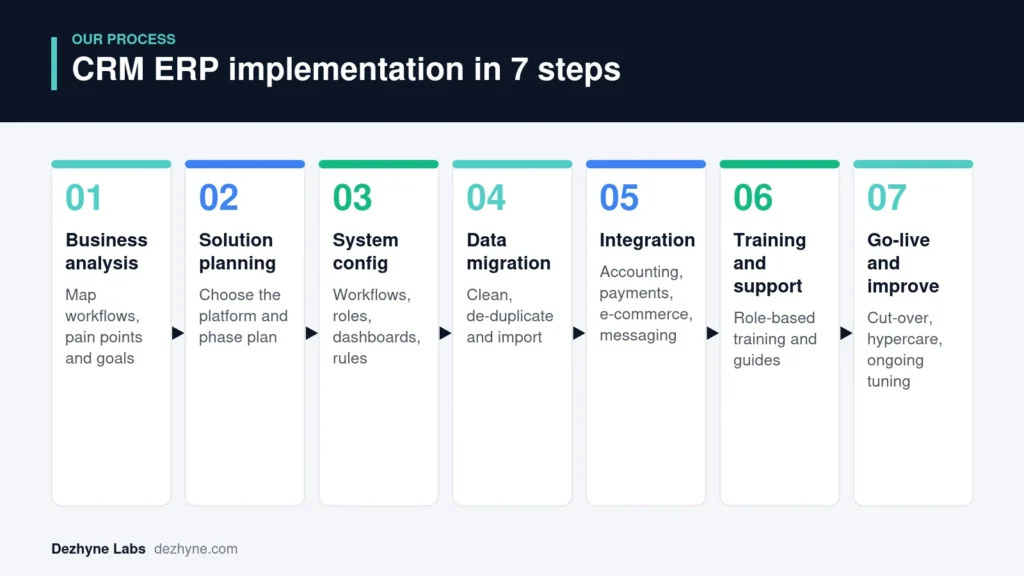
Every CRM ERP implementation we run follows the same seven steps, scaled to the size of the project.
1. Business Analysis
We begin by understanding your existing workflows, operational challenges, and future business objectives.
2. Solution Planning
Our consultants recommend the most suitable CRM and ERP platform based on your business size, industry, and budget.
3. System Configuration
We customize workflows, dashboards, user roles, automation rules, and reporting features to align with your business processes.
4. Data Migration
Existing customer records, inventory, financial information, and operational data are securely migrated into the new system.
5. Integration
We integrate your ERP and CRM software with accounting tools, payment gateways, HR systems, eCommerce platforms, marketing software, and third-party applications.
6. User Training & Support
Successful implementation depends on user adoption. We provide complete staff training, technical documentation, and ongoing support to ensure a smooth transition.
7. Go-Live and Continuous Improvement
We plan the cut-over date, run old and new systems side by side where needed, and stay close to your team through the first weeks. After go-live we review usage and reports, then refine workflows and automation as your business changes.
How Long Does a CRM ERP Implementation Take?
Timelines depend on scope, data quality and how quickly decisions are made. As a rough guide for planning:
- CRM only, small team – usually a few weeks, covering pipeline setup, lead capture, a handful of automations and training.
- ERP for a single entity – typically two to four months, including finance, inventory and purchasing with clean data migration.
- Combined CRM ERP implementation across branches or countries – often four to nine months, delivered in phases so each department goes live in turn.
The biggest delays rarely come from the software. They come from waiting on sign-offs, cleaning old data and late changes to scope. Naming one decision-maker on your side shortens almost every project.
What Drives the Cost of CRM ERP Implementation?
Two companies buying the same software can pay very different implementation costs. The main drivers are:
- Number of users and modules – licences and configuration effort grow with both.
- Customisation – standard workflows are quick to set up, while bespoke screens and logic take longer to build and maintain.
- Data migration – years of messy spreadsheets take far longer to clean than a recent, well-kept system.
- Integrations – each connection to accounting, e-commerce, payment or messaging tools adds design and testing time.
- Entities and countries – multiple currencies, tax rules and approval chains add complexity.
- Training and support – on-site sessions, documentation and ongoing help after go-live.
Ask for a quote that separates licences, implementation and annual support, so you can compare proposals fairly and budget for the years after launch.
Cloud or On-Premise?
Most new projects today run in the cloud, and for good reason. Cloud systems need no servers on your premises, receive updates automatically and can be reached securely from any branch or device. You pay a predictable subscription instead of a large upfront licence.
On-premise or private hosting still makes sense in a few cases: strict data residency rules, very large transaction volumes, or deep links to factory equipment on a local network. For most small and mid-sized businesses in India and the UAE, a cloud-based CRM ERP implementation is faster to launch and cheaper to run over five years.
Data Migration Checklist
Data migration is the step that most often decides whether a CRM ERP implementation goes live on time. Work through this checklist before any records are moved:
- List every source of data, including spreadsheets, old software, email folders and paper files.
- Decide what to bring across and what to archive. Closed deals from many years ago rarely need to move.
- Remove duplicates and agree on one format for names, phone numbers, addresses and product codes.
- Assign an owner for each data set who signs off that it is correct.
- Run a trial import into a test environment and check totals against the source.
- Freeze changes in the old system shortly before the final import, then reconcile balances on day one.
Preparing Your Team for the Change
New software changes how people spend their day, and some resistance is normal. Bring a few respected users from each department into the project early. They help design workflows that make sense on the shop floor and become the first people colleagues turn to with questions.
Explain why the change is happening in terms each team cares about: fewer manual entries for accounts, faster quotes for sales, accurate stock for the warehouse. Keep training short and role-based, and switch off the old spreadsheets once the new process is live, so there is only one place to work. Teams that are prepared this way adopt a CRM ERP implementation much faster than teams who simply receive a login on launch day.
Mistakes That Make a CRM ERP Implementation Fail
Most failed rollouts are not caused by the software. They are caused by decisions taken before and during the project. These are the problems we see most often:
- No single owner – when nobody is accountable for the CRM ERP implementation, decisions stall and timelines slip.
- Dirty data – migrating duplicate or incomplete records simply moves the old problem into a new system.
- Customising too early – heavy customisation before the team has used the standard workflow usually has to be rewritten later.
- Skipping training – adoption, not installation, decides whether the investment pays back.
- No integration plan – accounting, e-commerce, messaging and reporting tools should be mapped at the start, not after go-live.
A phased CRM ERP implementation avoids most of this: start with one department, prove the workflow, then extend it across the business.
You can see the full scope we cover on our CRM and ERP implementation page, or read how we handle website development when the system also needs a customer-facing portal.
Measuring Success After Go-Live
Agree on success measures before the project starts, then check them at 30, 90 and 180 days after launch. Useful measures include:
- Adoption – the share of users logging in and recording their work in the system every day.
- Lead response time – how quickly new enquiries are assigned and contacted.
- Month-end close – the number of days finance needs to close the books.
- Order-to-invoice time – how long it takes from a confirmed order to a sent invoice.
- Stock accuracy – how closely system stock matches physical counts.
- Report reliability – whether leaders trust dashboards without asking for a separate spreadsheet.
If a number is not moving, the fix is usually a workflow tweak or a short refresher session, not new software. That ongoing tuning is what turns a CRM ERP implementation from a one-time project into a lasting advantage.

Why Choose Dezhyne Labs?
Our experienced implementation specialists understand that every organization operates differently. Instead of offering one-size-fits-all solutions, we design customized CRM and ERP systems that improve efficiency, simplify operations, and support long-term business growth.
Our solutions help businesses:
- Automate workflows
- Improve customer engagement
- Centralize business data
- Increase operational visibility
- Enhance reporting accuracy
- Reduce manual work
- Improve collaboration
- Support digital transformation
Whether you’re implementing a new ERP system, upgrading your CRM platform, or integrating both into a unified business ecosystem, Dezhyne Labs delivers scalable, secure, and future-ready solutions.
Serving Businesses Worldwide
We proudly support businesses across multiple international markets, including:
- United Arab Emirates (UAE)
- Saudi Arabia
- Qatar
- Oman
- Kuwait
- Bahrain
- United Kingdom
- United States
- Canada
- Australia
- Germany
- Singapore
- India
Our global delivery model enables businesses to adopt world-class CRM and ERP solutions regardless of location, with project teams that plan around your time zone and local tax rules.
Frequently Asked Questions
Should we implement CRM and ERP together or one at a time?
Plan them together, then roll out in phases. Designing the connection between sales and operations up front avoids rework, while going live one department at a time keeps the change manageable for your team.
Can our existing data be moved into the new system?
Yes. Customer lists, open deals, product masters, opening stock and open invoices are normally migrated. We clean and de-duplicate records first, because a CRM ERP implementation is only as good as the data it starts with.
Will our team need training?
Yes, and it matters more than any feature. We train users by role, provide short how-to guides, and stay available after go-live so questions are answered before people return to old habits.
How much does a CRM ERP implementation cost?
It depends on users, modules, customisation, data volume and integrations. A focused CRM setup for a small sales team costs far less than a multi-entity ERP rollout. We scope the work first and give a fixed quote for each phase, so the cost of your CRM ERP implementation is clear before you commit.
Can the system work with GST in India and VAT in the UAE?
Most mainstream CRM and ERP platforms support GST and UAE VAT, either natively or through localisation packs. We confirm this for your chosen platform during solution planning, before any configuration starts.
Future-Proof Your Business Today
Digital transformation is no longer optional. Companies that invest in CRM and ERP implementation gain a competitive advantage through automation, improved customer experiences, data-driven decision-making, and operational efficiency.
Whether your goal is increasing sales, improving customer service, managing inventory, streamlining finance, or connecting every department into one intelligent platform, Dezhyne’s CRM & ERP implementation services provide the technology foundation your business needs to grow.
Ready to modernize your business? Contact Dezhyne Labs today and discover how the right CRM ERP implementation can transform your operations.