
Intelligent AI Automation Services for Modern Businesses
Reduce repetitive work, connect your business tools and create more responsive customer experiences with practical AI automation from Dezhyne Labs.
Turn Manual Work into Connected Workflows.
Manual data entry, repeated customer questions, missed follow-ups and disconnected applications can make everyday operations harder to manage. These tasks consume staff time and make it more difficult to keep information consistent.
We design AI automation workflows around the way your business operates. We look at the process, the systems involved, the information that needs to move and the points where a person should review or make a decision.
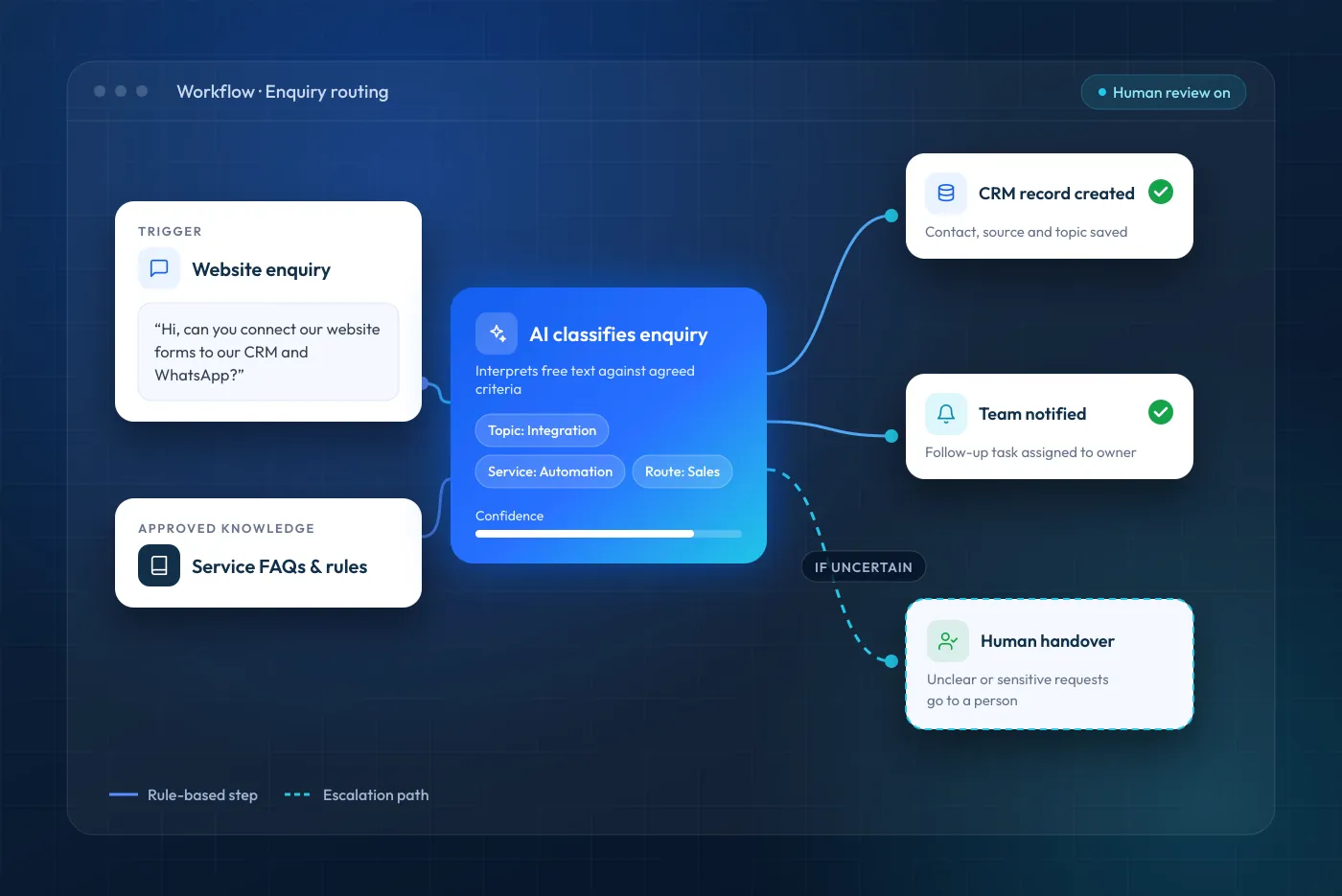
Depending on the requirements, an automation may collect an enquiry, organise the information, create or update a record in a compatible system, notify the right team member or trigger a follow-up task. The exact workflow depends on the available applications, access permissions, integration options and agreed scope.
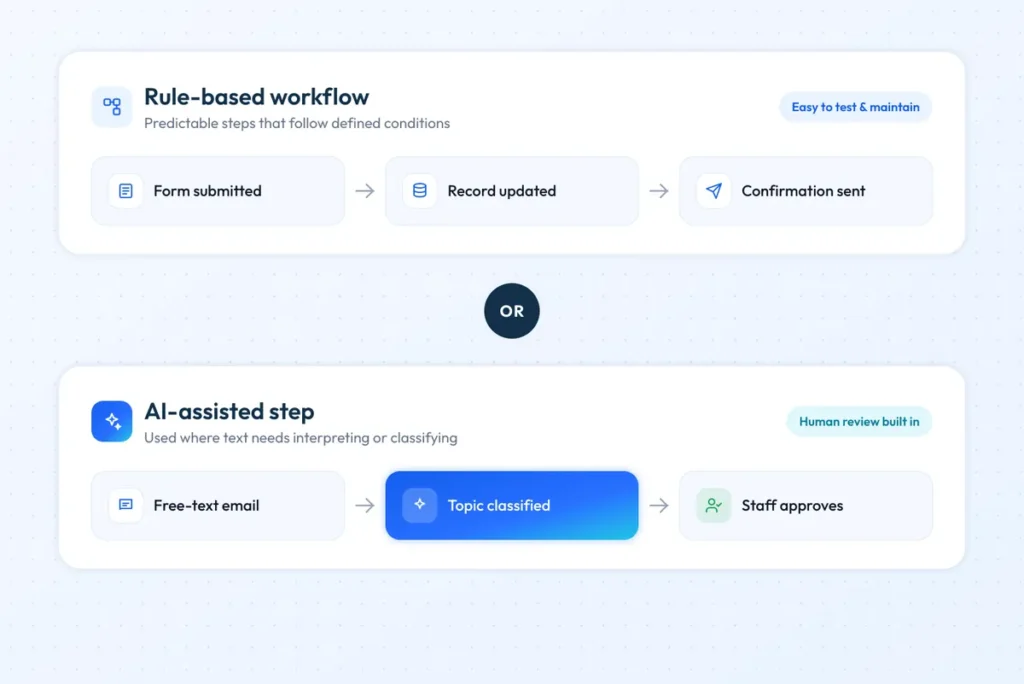
Not every process needs artificial intelligence. Where a straightforward rule-based workflow is more reliable, easier to maintain or more cost-effective, we will recommend that approach instead. The aim is to solve the operational problem, not to add AI for its own sake.
AI conversations
Website chat that answers from approved business content.
Lead classification
Enquiries sorted against criteria you agree.
Connected systems
Information moved between compatible business tools.
Human oversight
Clear handover when a person needs to decide.
AI, Workflow Automation or Both?
AI-enabled steps are useful when a workflow needs to interpret or classify less-structured information, for example identifying the topic of an enquiry or drafting a response from approved business content. These outputs should have defined boundaries and review paths.
Conventional workflow automation is often better for predictable actions, such as moving a form response into a system, sending a status notification or creating a task when a defined condition is met. These steps are easier to test and maintain without an AI model.
CRM and ERP implementation focuses on configuring, adopting and connecting business systems. AI automation can sit alongside it, but does not replace sound system design, data governance or a suitable integration foundation. Where that is the main requirement, see our CRM and ERP implementation service.
The intended benefits include more consistent information handling, clearer ownership of enquiries and fewer repetitive manual steps. Actual outcomes depend on the process, data quality, adoption and ongoing operation.
AI Automation Services Shaped Around Your Operations.
Choose a focused automation project or combine suitable workflows into a connected process. Platform compatibility and delivery scope are confirmed during discovery, before a proposal is issued.
AI chatbot development
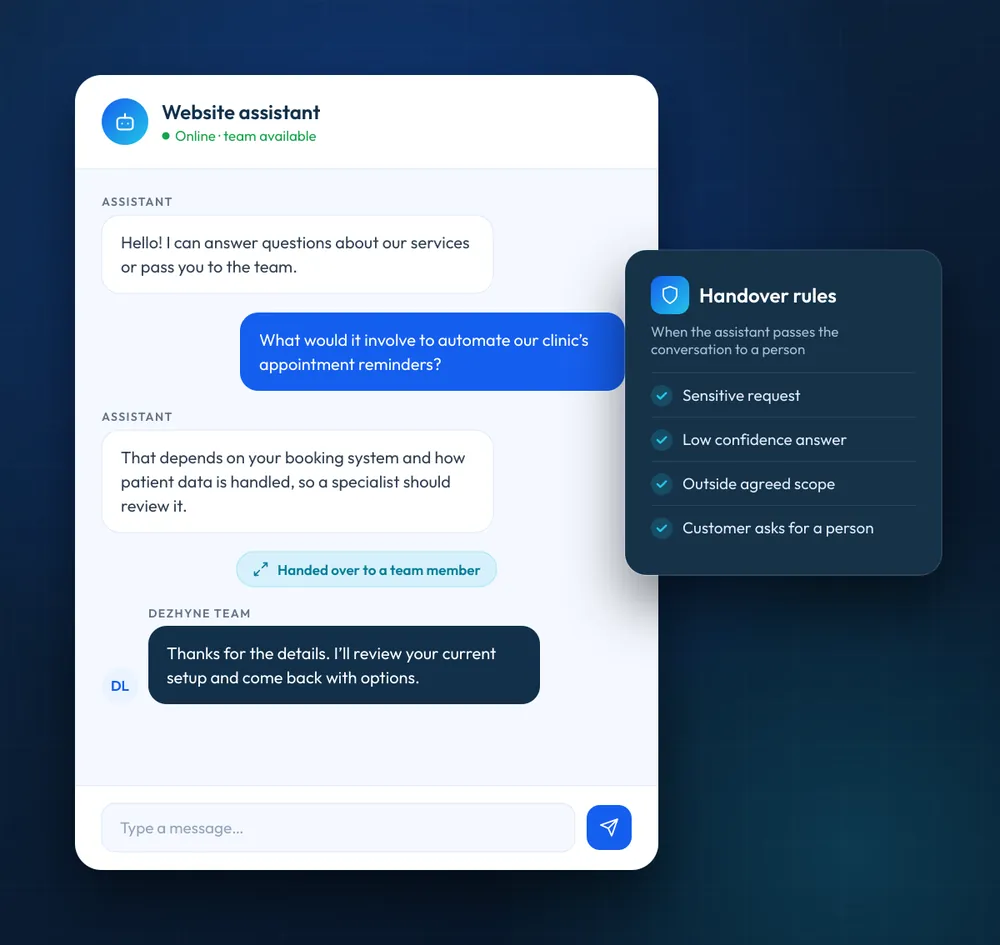
Give website visitors a clearer route to useful information, with a team member taking over when a request is uncertain, sensitive or out of scope.
- Website chatbot planning and integration
- Answers grounded in approved business information
- Enquiry and contact-detail capture
- Routing and human handover rules
- Review of unanswered questions, where in scope
WhatsApp Business automation
Organise selected customer communications through a suitable WhatsApp Business Platform setup, subject to consent, approved templates and platform rules.
- Supported enquiry and response workflows
- Customer notifications and status updates
- Appointment reminders or confirmations
- Enquiry routing and follow-up tasks
- Human handover for complex requests
AI lead capture and qualification
Help your team organise incoming enquiries and prioritise follow-up. Classification supports staff decisions rather than replacing them.
- Lead capture from agreed channels
- Categorisation against defined criteria
- Qualification questions and routing rules
- CRM record creation or updates
- Follow-up tasks and team notifications
Business workflow automation
Connect routine steps across compatible applications, using rules for predictable steps and AI only where interpretation adds a clear benefit.
- Data transfer between connected applications
- Approval and notification workflows
- Form and document intake processes
- Task creation and status updates
- Exception alerts and process logs
AI customer-support automation
Support service teams by organising routine requests and answering suitable questions from an approved knowledge source, with clear escalation to a person.
- Answers from approved knowledge sources
- Customer-query categorisation
- Support ticket creation, where integrated
- Routing by topic or agreed priority
- Human escalation and review
CRM, ERP and API integration
Make information easier to share between business systems. We assess APIs, connectors, permissions and data structures before recommending an approach.
- CRM lead and contact updates
- Sales-pipeline workflow triggers
- ERP data workflows, where supported
- API and webhook connections
- Data validation and error handling
From Discovery to Deployment.
A practical delivery process, so the workflow, dependencies and expected behaviour are understood before an automation goes live.
Discover and Assess
We review the current process, the people and applications involved and the tasks causing delay, and consider whether AI is appropriate or a simpler workflow is the better option.
Plan the Workflow
We define the steps, decision points, data requirements, access permissions, exception paths and the situations that need human review.
Build and Integrate
We configure the agreed AI components and automation logic, then connect the required applications using suitable connectors, APIs or webhooks.
Test and Validate
We test representative scenarios, exceptions, data handling and handover paths against the agreed criteria, and resolve issues before any production release.
Launch and Improve
We support the agreed deployment and handover. Monitoring, maintenance and optimisation are separate scope items unless included in the proposal.
Technology Guided by Business Needs.
Successful automation starts with a process worth improving. We understand the operational requirement first, then choose the most suitable mix of workflow logic, AI and system integration.
- Process-first thinking: we start with the task, the people involved and the outcome you want to improve.
- The right level of automation: rules for predictable tasks, AI only where interpretation or language genuinely helps.
- Fit with existing systems: we assess how your website, CRM, ERP and other tools can work together.
- Human oversight and clear handovers: we define when an automation should stop, ask or pass work to a person.
- Testing and maintainability: we cover normal scenarios and exceptions, and how the workflow will be updated.
- Transparent scope: proposals list included work, exclusions, third-party costs and client responsibilities.
AI Automation Use Cases by Industry.
The right workflow depends on each organisation’s processes, systems and responsibilities. These are illustrative opportunities to assess, not a promise that every use case suits every business.
E-commerce and retail
Order-status notifications, product enquiries, customer-service routing and post-purchase follow-up workflows.
Real estate
Property-enquiry capture, lead distribution, viewing requests and agent notifications.
Healthcare and clinics
Appointment requests and reminders, considered only once data access, safeguards, retention and local requirements have been reviewed. No compliance status is implied.
Education and training
Course enquiries, admissions administration, student reminders and information requests.
Professional services
Client onboarding steps, document collection, enquiry routing and appointment coordination.
Manufacturing and B2B
Enquiry distribution, internal approvals, order updates and information flows between compatible business systems.
Technology and Integrations.
We choose tools to fit the workflow. These are examples we evaluate for each project, not a claim of certification, partnership or support for every product.
Data, Access and Operating Costs
Before implementation, we agree what data the workflow can access, where it is processed, which services receive it, how credentials are managed, what logs are kept and who approves the data flow. Passwords, payment details and unnecessary sensitive information are kept out of prompts and logs.
A platform name or integration method is not a guarantee of compatibility. We confirm the product edition, API access, authentication, rate limits, data fields and licensing during discovery. Third-party subscriptions, messaging charges, model or API usage and hosting may be additional to our project fees, and are identified before work begins, along with monitoring, maintenance and support arrangements.
Where the website is part of the requirement, see our website development service.
Find the Right Automation Opportunity for Your Business.
You do not need to automate everything at once. Start with one process that takes too much time, creates avoidable delays or makes it difficult to keep customers informed. Tell us how it works today, who is involved, which tools you use and what you would like to improve.
Prefer to look around first? Explore all our services.
Frequently Asked Questions
What are AI automation services?
AI automation services combine artificial intelligence with software workflows to support tasks such as interpreting routine enquiries, classifying information, drafting responses from approved content and routing work. The level of automation should match the task and include safeguards appropriate to the risk.
What is the difference between AI automation and workflow automation?
Workflow automation follows defined rules to move information or trigger actions. AI automation adds capabilities such as language understanding or classification where these are useful. Many business processes need only conventional automation; AI should be included only when it adds a practical benefit.
Can AI automation work with our existing CRM or ERP?
It may be possible where the system provides a suitable API, connector or other supported integration route. Compatibility depends on the product edition, permissions, data structure, vendor restrictions and project requirements, which we assess before confirming scope.
Can you automate our existing business process?
We can review a process to identify suitable steps for automation. The recommended approach depends on how the process works today, the systems involved, data quality, exceptions and the need for staff approval. Some processes benefit from redesign before automation.
Can you build an AI chatbot for our website?
A website chatbot can be developed to respond using approved business information, collect enquiry details and direct conversations to your team when needed. The supported content, escalation rules, integrations and ongoing review arrangements are agreed for each project.
Can WhatsApp messages be automated?
Selected customer communications can be automated through the WhatsApp Business Platform, subject to account setup, user consent, approved message templates where required, platform policies and supported integrations. Availability and message charges are confirmed before implementation.
How is customer data handled?
Data access and handling are defined during discovery. We agree what information is required, which systems and third parties process it, who has access, how credentials are protected, what is logged and how long information is retained. Requirements vary by use case and jurisdiction, and no compliance status is implied.
Will customers still be able to speak to a person?
Yes. Human handover can be designed for complex, sensitive, uncertain or out-of-scope requests. The workflow makes it clear when a person takes over and how the conversation or task is passed to them.
How long does an AI automation project take?
Timelines vary with workflow complexity, integration availability, testing needs, approvals and access to the required systems. We provide a realistic estimate once the scope and dependencies have been reviewed.
What affects the cost of an automation project?
Cost depends on the number and complexity of workflows, integrations, data requirements, testing, deployment and any agreed support. Third-party subscriptions, model or API usage, messaging charges and hosting may be separate costs, and are identified in the proposal.
What does the first engagement include?
The first step is a discussion of the process, business objective, applications and constraints. Any discovery assessment, process map, technical specification, prototype or feasibility report is listed explicitly in the proposal rather than assumed.
Do you provide ongoing monitoring and maintenance?
Monitoring, maintenance, optimisation and support can be discussed as part of the engagement. The proposal states whether these services are included, the support arrangements, responsibilities and any additional fees.